
Prototype Demo
Role
UX Design Intern
Duration
Sep 2024 - Jan 2025
Sep 2024 - Jan 2025
Tools
Figma, FigJam, Miro, Notion, Microsoft Copilot
Project Overview
Eryn is a job analysis platform that helps compensation consultants streamline role evaluations, collect job data, and establish compensation baselines. As a UX design intern, I collaborated with stakeholders, the design team, and users to create an interface that enhances the job analysis experience.
Eryn is a job analysis platform that helps compensation consultants streamline role evaluations, collect job data, and establish compensation baselines. As a UX design intern, I collaborated with stakeholders, the design team, and users to create an interface that enhances the job analysis experience.
Eryn is a job analysis platform that helps compensation consultants streamline role evaluations, collect job data, and establish compensation baselines. As a UX design intern, I collaborated with stakeholders, the design team, and users to create an interface that enhances the job analysis experience.
Results
The redesigned platform offers a more intuitive and user-friendly experience, simplifying the job analysis process for compensation consultants.
The improved questionnaire feature resulted in less anxiety for users, leading to more honest and accurate responses.
By consolidating multiple tools into one system, the platform reduced the time spent on job analysis tasks, improving overall efficiency and productivity.
The redesigned platform offers a more intuitive and user-friendly experience, simplifying the job analysis process for compensation consultants.
The improved questionnaire feature resulted in less anxiety for users, leading to more honest and accurate responses.
By consolidating multiple tools into one system, the platform reduced the time spent on job analysis tasks, improving overall efficiency and productivity.
The redesigned platform offers a more intuitive and user-friendly experience, simplifying the job analysis process for compensation consultants.
The improved questionnaire feature resulted in less anxiety for users, leading to more honest and accurate responses.
By consolidating multiple tools into one system, the platform reduced the time spent on job analysis tasks, improving overall efficiency and productivity.
Context
The platform lacked the intuitiveness needed for a smooth user experience. Users found the data collection features stressful, as it felt more like a test. Additionally, there was no timely feedback, leaving users uncertain about their progress. These issues negatively impacted the quality of the data collected, creating a frustrating experience and reducing the platform’s overall effectiveness.
The platform lacked the intuitiveness needed for a smooth user experience. Users found the data collection features stressful, as it felt more like a test. Additionally, there was no timely feedback, leaving users uncertain about their progress. These issues negatively impacted the quality of the data collected, creating a frustrating experience and reducing the platform’s overall effectiveness.
Process
Based on the Double Diamond Framework
Discover
This phase focused on evaluating the existing job analysis platform to identify usability challenges, assess user behaviors, and gather insights for the redesign.
This phase focused on evaluating the existing job analysis platform to identify usability challenges, assess user behaviors, and gather insights for the redesign.
Usability Audit
As a team, we began the redesign process by thoroughly auditing the existing Eryn platform to identify usability issues, accessibility gaps, and areas of inconsistency with the brand.
The audit involved documenting each screen of the platform in FigJam, a collaborative design tool, and annotating the issues directly on the screenshots.
As a team, we began the redesign process by thoroughly auditing the existing Eryn platform to identify usability issues, accessibility gaps, and areas of inconsistency with the brand.
The audit involved documenting each screen of the platform in FigJam, a collaborative design tool, and annotating the issues directly on the screenshots.
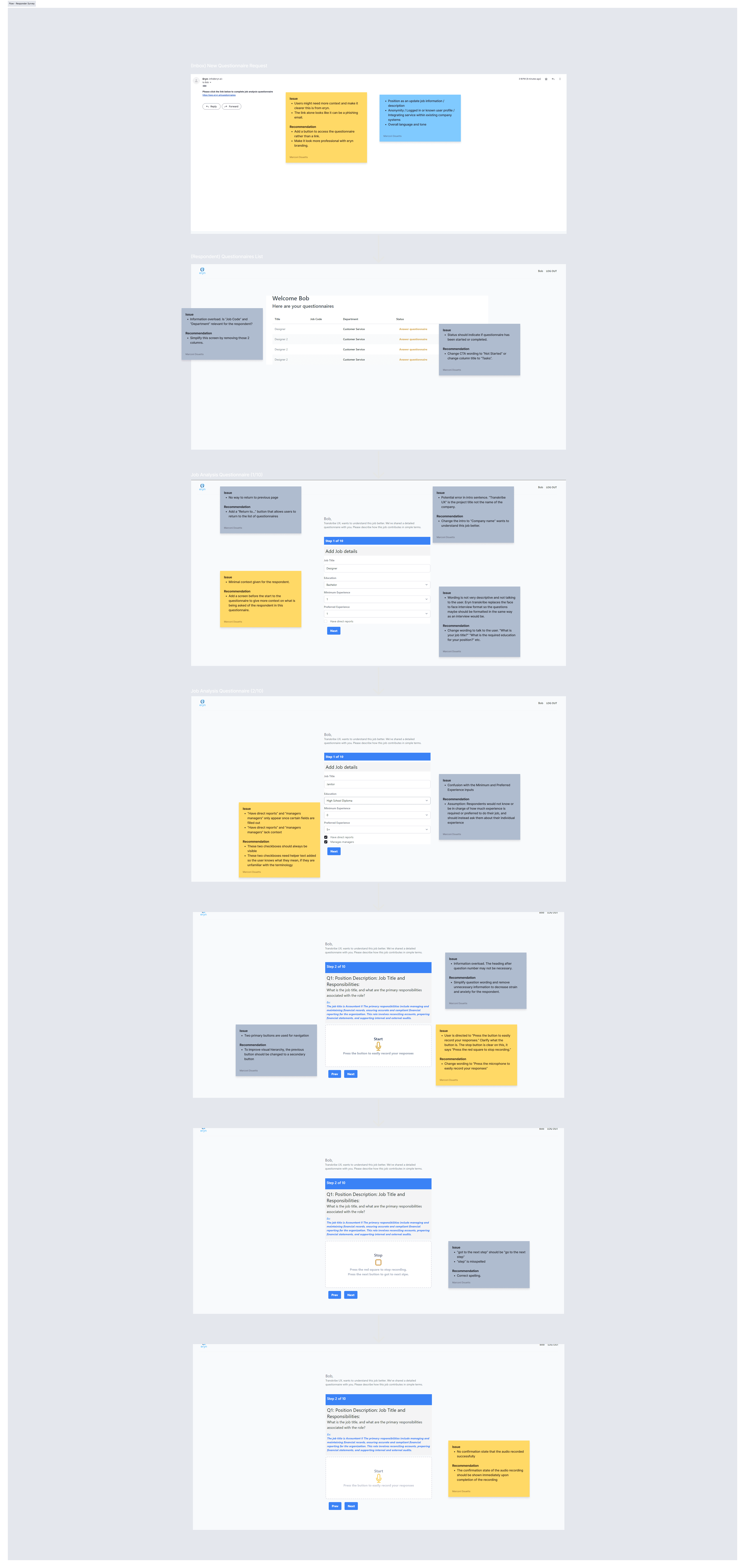
Few Screens from Usability Audit
Heuristic Evaluation
I conducted a heuristic evaluation of the system using Jakob Nielsen’s 10 Usability Heuristics. This method allowed me to systematically assess the platform for usability issues and areas of improvement.
Below is a summary of the evaluation:
I conducted a heuristic evaluation of the system using Jakob Nielsen’s 10 Usability Heuristics. This method allowed me to systematically assess the platform for usability issues and areas of improvement.
Below is a summary of the evaluation:
✕
Visibility of system status
Visibility of system status
✕
Match between the system and the real world
Match between the system and the real world
✕
User control and freedom
User control and freedom
✓
Consistency and standards
Consistency and standards
✕
Error prevention
Error prevention
✓
Recognition rather than recall
Recognition rather than recall
✕
Flexibility and efficiency of use
Flexibility and efficiency of use
✓
Aesthetic and minimalist design
Aesthetic and minimalist design
✕
Help users recognize, diagnose, and recover from errors
Help users recognize, diagnose, and recover from errors
✕
Help and documentation
Help and documentation
Usability Testing
To further understand the pain points and usability issues in the current system, I conducted usability testing with 3 participants. The primary task was to assess the job questionnaire feature.
The following feedback was unanimous among all participants, highlighting key areas for improvement:
To further understand the pain points and usability issues in the current system, I conducted usability testing with 3 participants. The primary task was to assess the job questionnaire feature.
The following feedback was unanimous among all participants, highlighting key areas for improvement:
Uncertainty About Recorded Responses
3 out of 3 users were unsure of whether or not their responses had been successfully recorded.
Preference for Typed Responses
3 out of 3 users expressed preference to type answers instead of asynchronous audio recording.
Perception of a Test-Like Experience
3 out of 3 users felt the questionnaire resembled a test, causing unnecessary stress during the process.
Define
This phase focused on synthesizing insights from evaluations and testing to define user needs, map behaviors, and establish key design priorities for an improved platform experience.
This phase focused on synthesizing insights from evaluations and testing to define user needs, map behaviors, and establish key design priorities for an improved platform experience.
User Types
We defined two distinct user types based on their roles, goals, and interactions with the job analysis platform: the Consultant, who uses the platform to analyze and act on collected data, and the Respondent, who completes the job questionnaire. These user types helped us guide design decisions by focusing on the specific needs and workflows of each group.
We defined two distinct user types based on their roles, goals, and interactions with the job analysis platform: the Consultant, who uses the platform to analyze and act on collected data, and the Respondent, who completes the job questionnaire. These user types helped us guide design decisions by focusing on the specific needs and workflows of each group.

Consultant
Goal: Review, interpret, and utilize job data for decision-making
Needs: A well-organized dashboard, efficient data visualization, and easy access to insights
Respondent
Goal: Accurately and efficiently complete the job questionnaire
Needs: A streamlined, intuitive interface with clear guidance and progress tracking
How Might We
We centered our redesign around two core How Might We (HMW) questions to address the distinct needs of both Eryn’s key user types:
We centered our redesign around two core How Might We (HMW) questions to address the distinct needs of both Eryn’s key user types:
Consultants
How might we streamline the platform's interface to enhance usability and efficiency in data analysis?
How might we streamline the platform's interface to enhance usability and efficiency in data analysis?
Respondents
How might we make the questionnaire experience feel more conversational and engaging, minimizing the stress of completing it?
How might we make the questionnaire experience feel more conversational and engaging, minimizing the stress of completing it?
User Flows
We mapped out the user flow for both consultant and respondent roles. This process helped us visualize user pathways and identify potential friction points in their experience.
We mapped out the user flow for both consultant and respondent roles. This process helped us visualize user pathways and identify potential friction points in their experience.
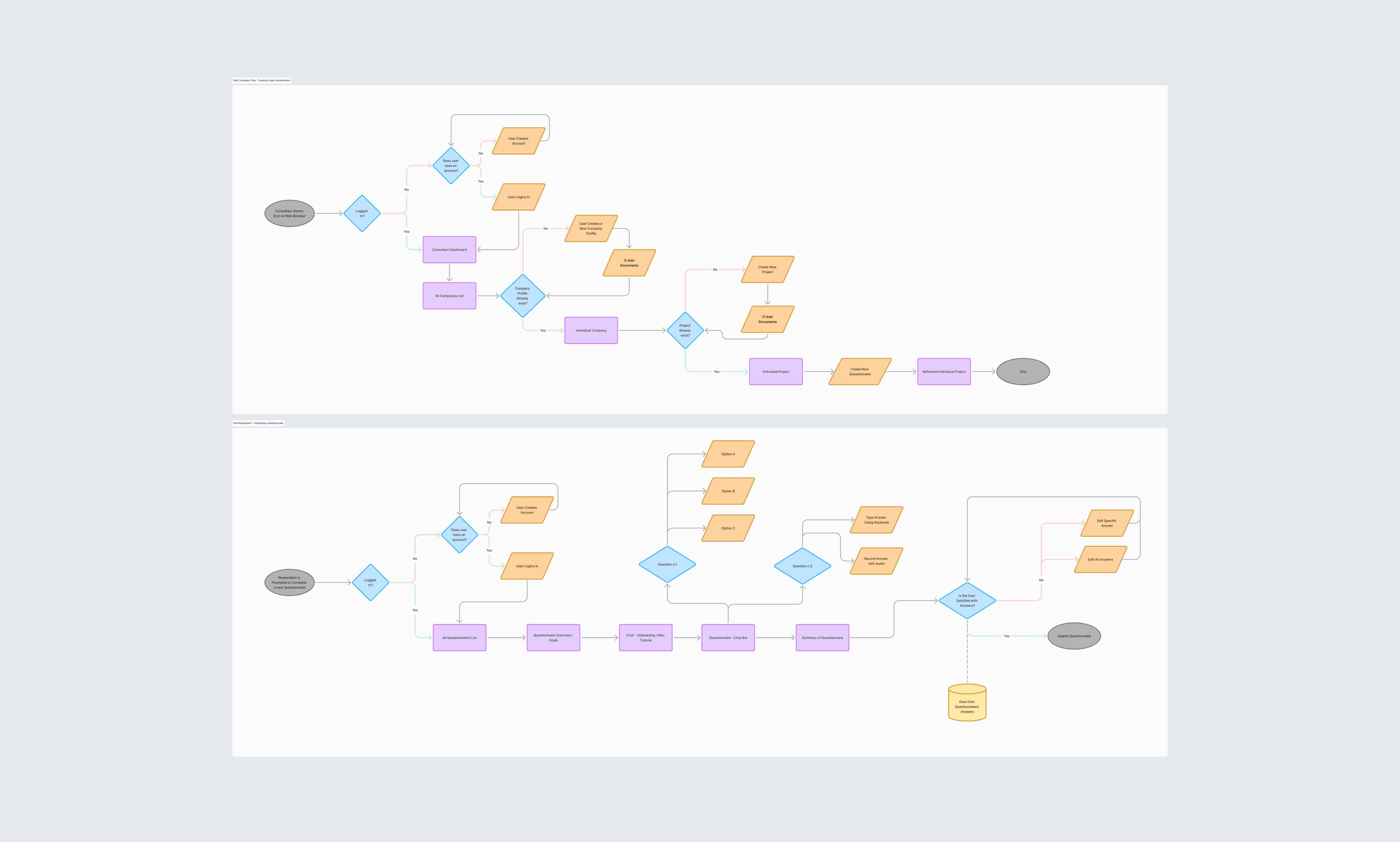
User Flows
Copilot Exploration
We sought to address user perceptions that the job questionnaire felt like a test. To create a more familiar and engaging experience, we decided to explore integrating a chatbot interface—a format users often associate with casual, conversational interactions.
Microsoft Azure Copilot was utilized to design the logic for a chatbot-style questionnaire. This process helped us understand the system’s capabilities and informed subsequent design decisions.
We sought to address user perceptions that the job questionnaire felt like a test. To create a more familiar and engaging experience, we decided to explore integrating a chatbot interface—a format users often associate with casual, conversational interactions.
Microsoft Azure Copilot was utilized to design the logic for a chatbot-style questionnaire. This process helped us understand the system’s capabilities and informed subsequent design decisions.
Here, you can see a live chatbot demo from Copilot Studio, where the logic guides users through a series of questions to categorize job roles and collect essential information.
Here, you can see a live chatbot demo from Copilot Studio, where the logic guides users through a series of questions to categorize job roles and collect essential information.
Chatbot Demo
Here is a snippet of the code that powers the chatbot, showing how the responses trigger the Copilot logic:
Here is a snippet of the code that powers the chatbot, showing how the responses trigger the Copilot logic:
# This YAML file defines the actions and flow for the Copilot chatbot.
actions:
- kind: SendActivity
  id: sendActivity_soLzRa
  activity: Hi there! I am  eryn and I am here to gather some info about your job.

- kind: Question
  id: question_ChYQkI
  interruptionPolicy:
    allowInterruption: true

  variable: init:Topic.Var1
  prompt: What is the job title and what does it do?
  entity: StringPrebuiltEntity

- kind: Question
  id: question_VH3Wum
  interruptionPolicy:
    allowInterruption: true

  variable: Topic.Var2
  prompt: Do any employees directly report into this role?
  entity: BooleanPrebuiltEntity

- kind: ConditionGroup
  id: conditionGroup_5fzKe7
  conditions:
    - id: conditionItem_Aiwhk6
      condition: =Topic.Var2 = false
      actions:
        - kind
Develop
This phase focused on brainstorming, iterating on design solutions, and creating prototypes that align with user needs and platform requirements.
This phase focused on brainstorming, iterating on design solutions, and creating prototypes that align with user needs and platform requirements.
Wireframes
In Figma, we created mid-fidelity wireframes to outline the structure and layout of the redesigned platform.
In Figma, we created mid-fidelity wireframes to outline the structure and layout of the redesigned platform.
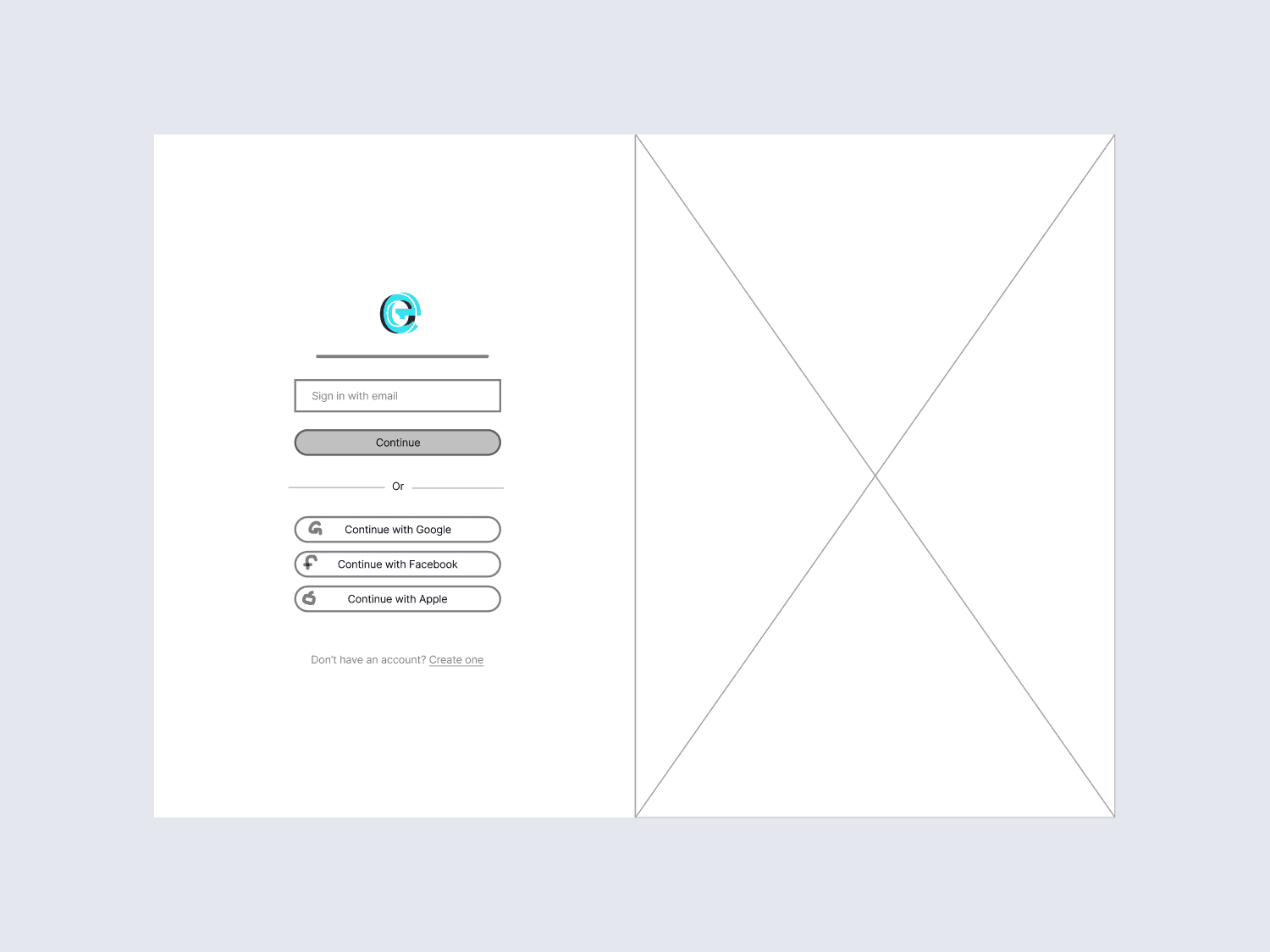
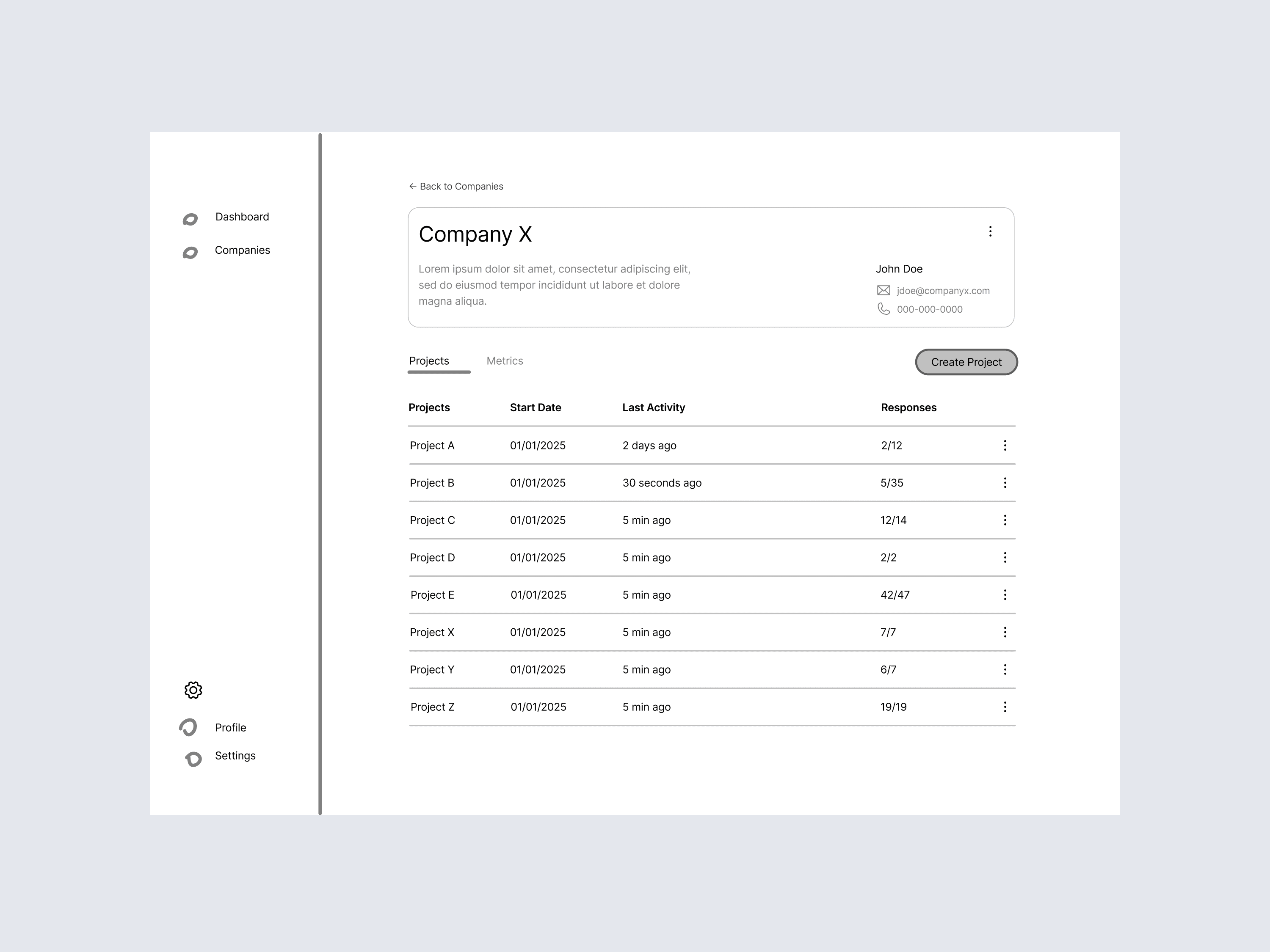
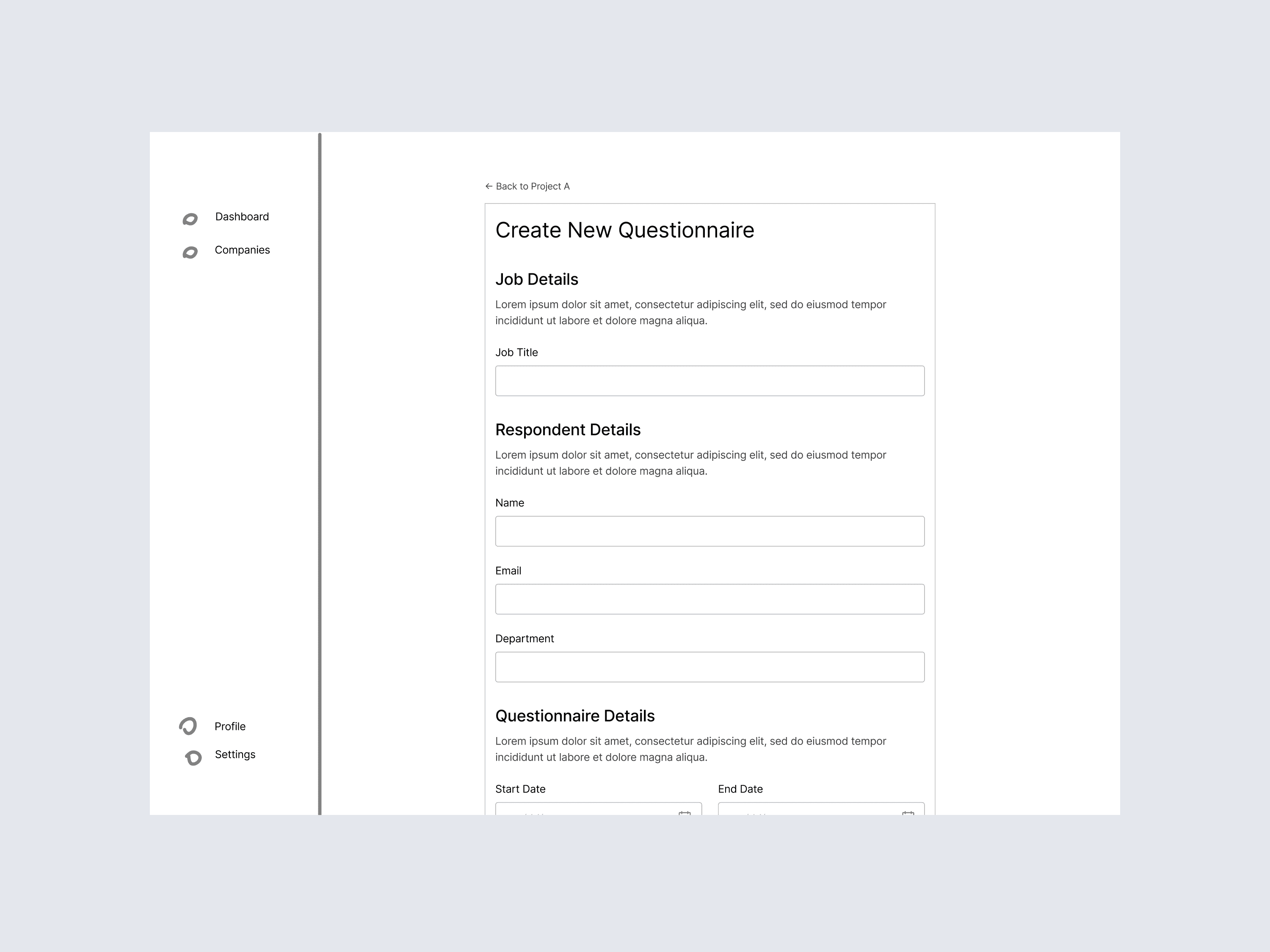
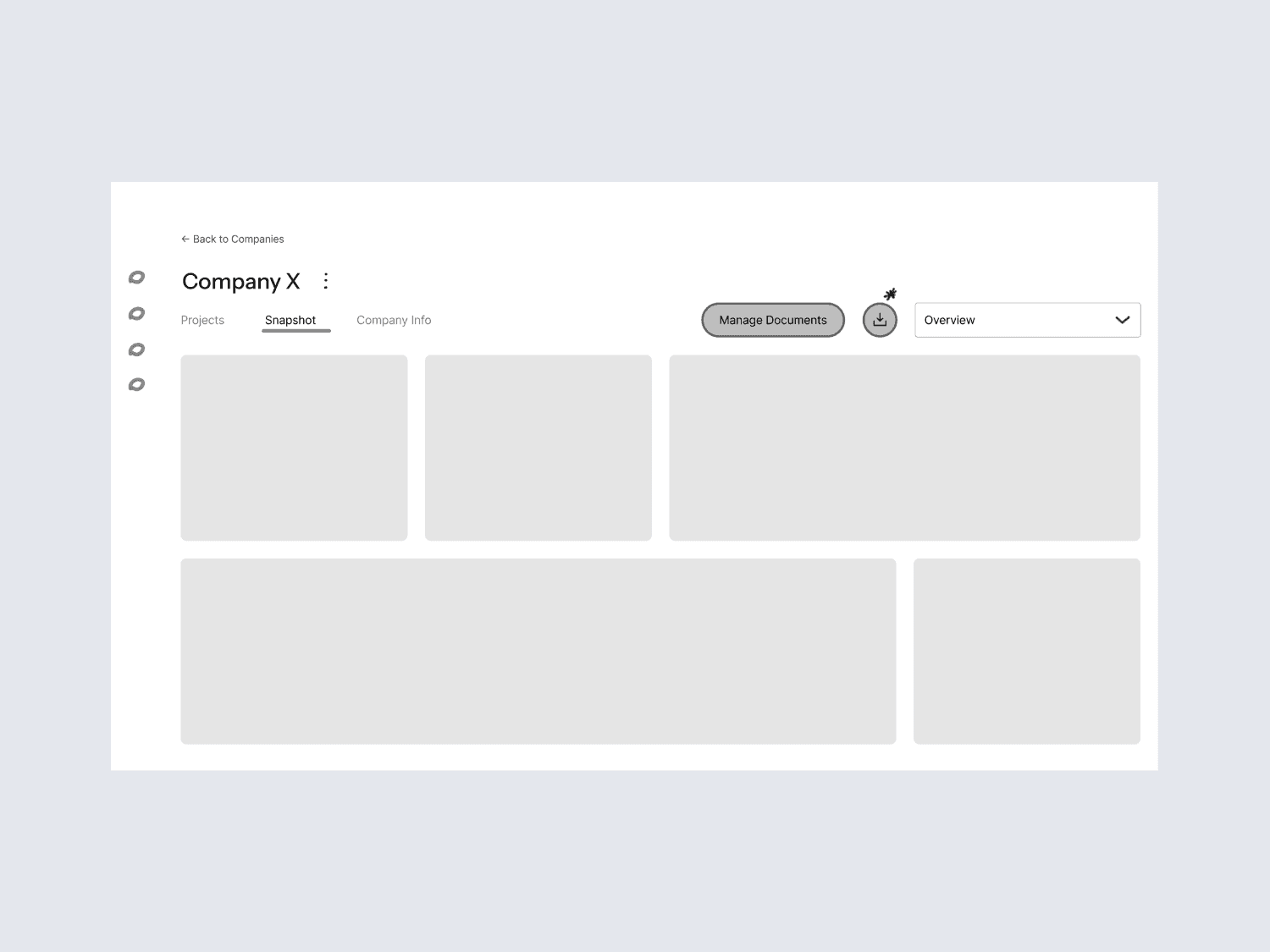
Wireframes
Prototype
Using the wireframes as a base, we developed an interactive, high-fidelity prototype. This prototype closely resembled the final design, including updated visuals, navigation, and flow. It allowed us to test the new interface with users, gather feedback, and make necessary adjustments.
Using the wireframes as a base, we developed an interactive, high-fidelity prototype. This prototype closely resembled the final design, including updated visuals, navigation, and flow. It allowed us to test the new interface with users, gather feedback, and make necessary adjustments.
Prototype Demo
Design System
A comprehensive design system was developed to ensure consistency across all aspects of the Eryn platform. This system included standardized UI components, color palettes, and typography, enabling a cohesive user experience. This laid the foundation for scalable future design work and streamlined the overall design process.
A comprehensive design system was developed to ensure consistency across all aspects of the Eryn platform. This system included standardized UI components, color palettes, and typography, enabling a cohesive user experience. This laid the foundation for scalable future design work and streamlined the overall design process.
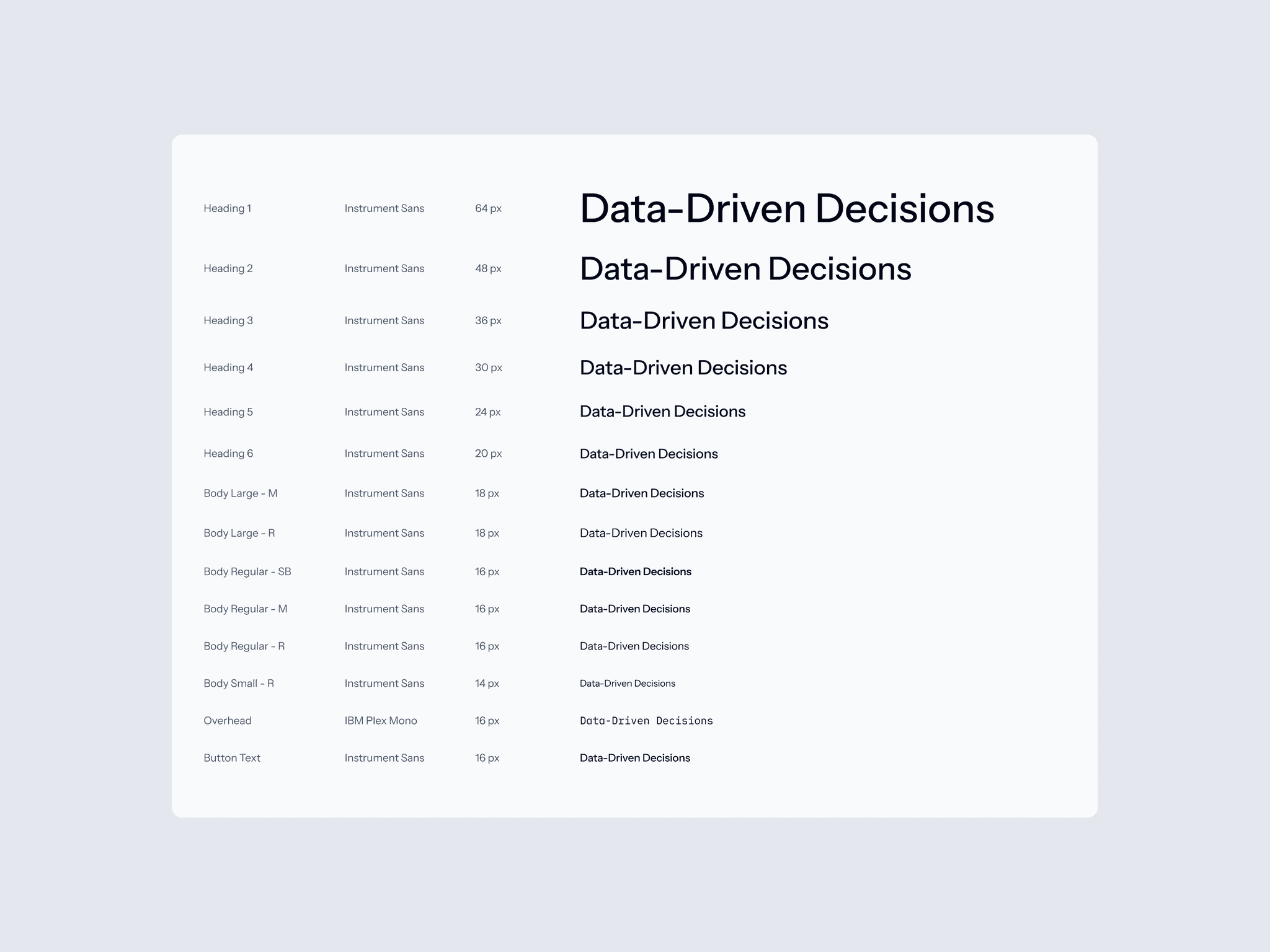
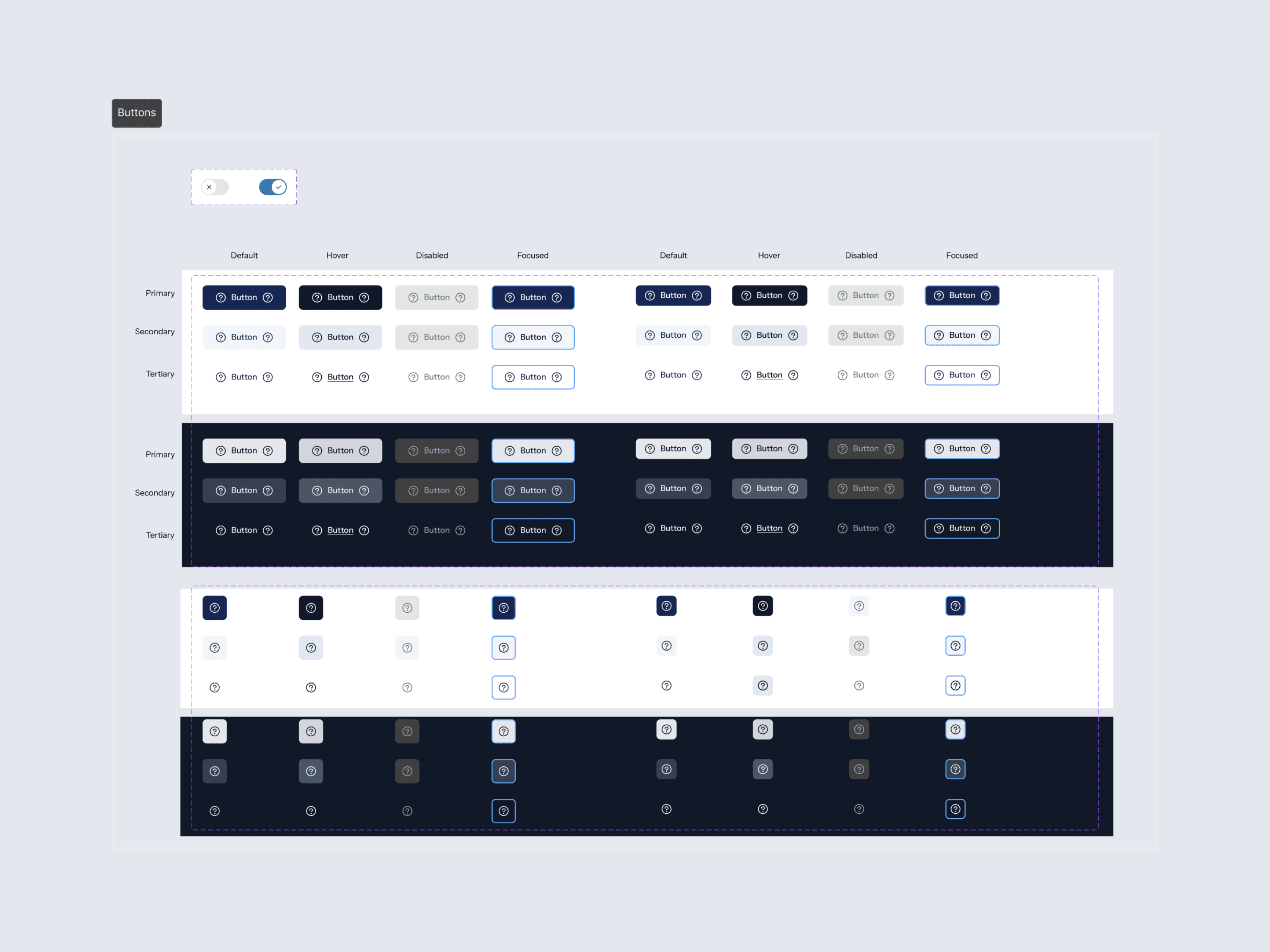
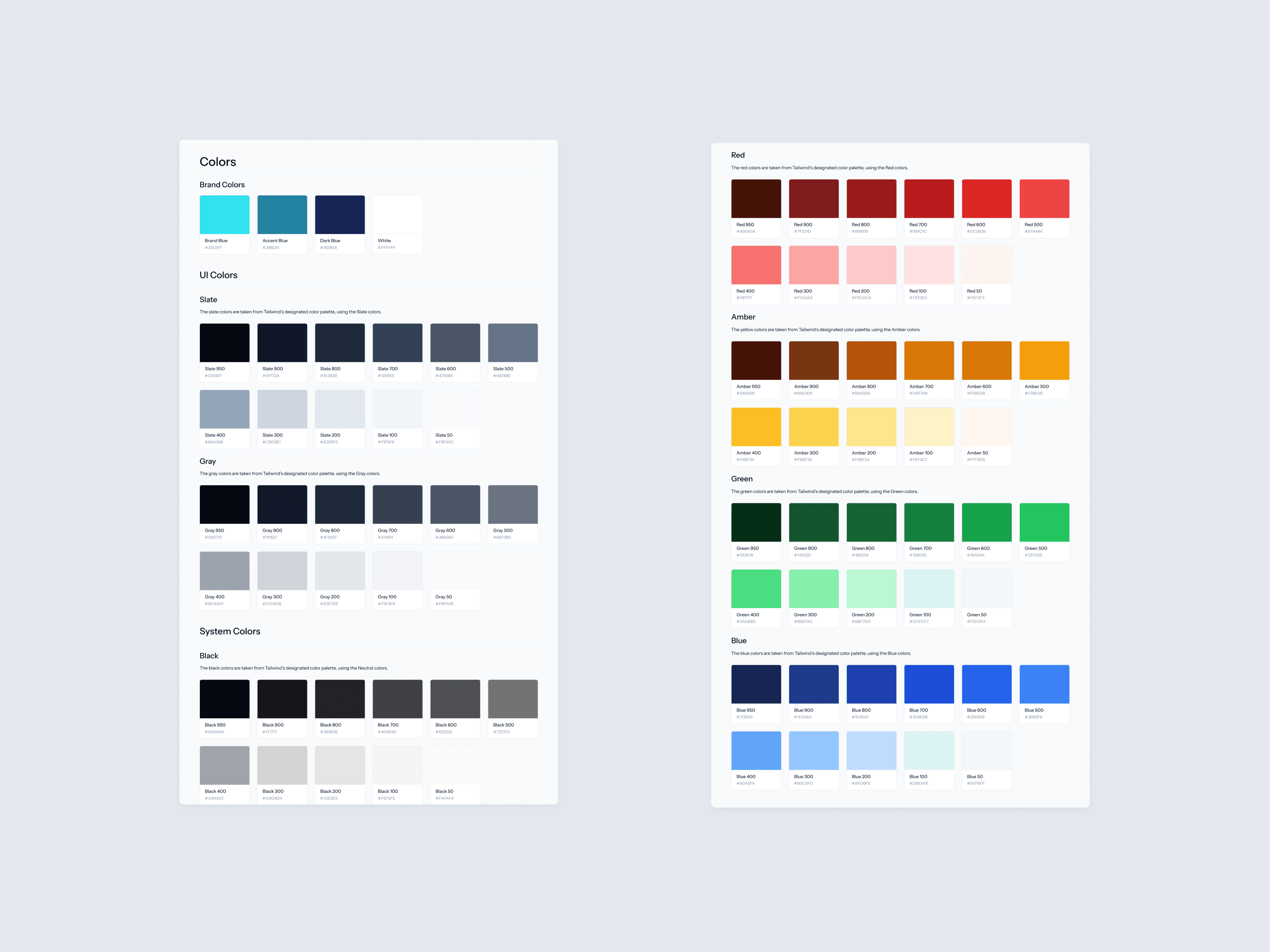
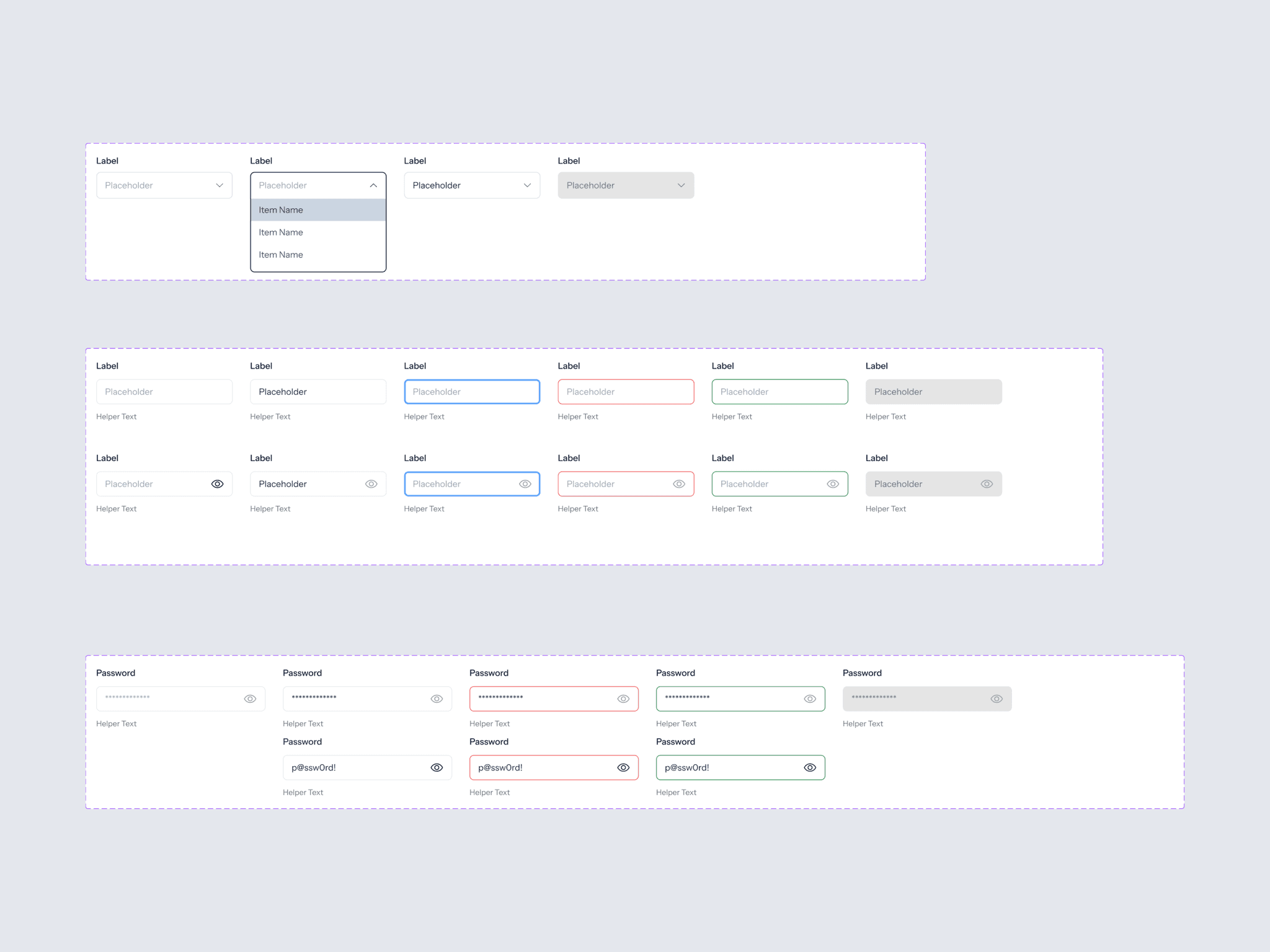
Some Components from the Design System
Deliver
We conducted usability testing with 4 users who matched the target audience. The goal was to assess how easily they could navigate the new interface, complete tasks, and provide feedback on the redesigned questionnaire feature.
The insights gathered from these sessions were synthesized and analyzed using Miro to identify key patterns and refine the design further.
We conducted usability testing with 4 users who matched the target audience. The goal was to assess how easily they could navigate the new interface, complete tasks, and provide feedback on the redesigned questionnaire feature.
The insights gathered from these sessions were synthesized and analyzed using Miro to identify key patterns and refine the design further.
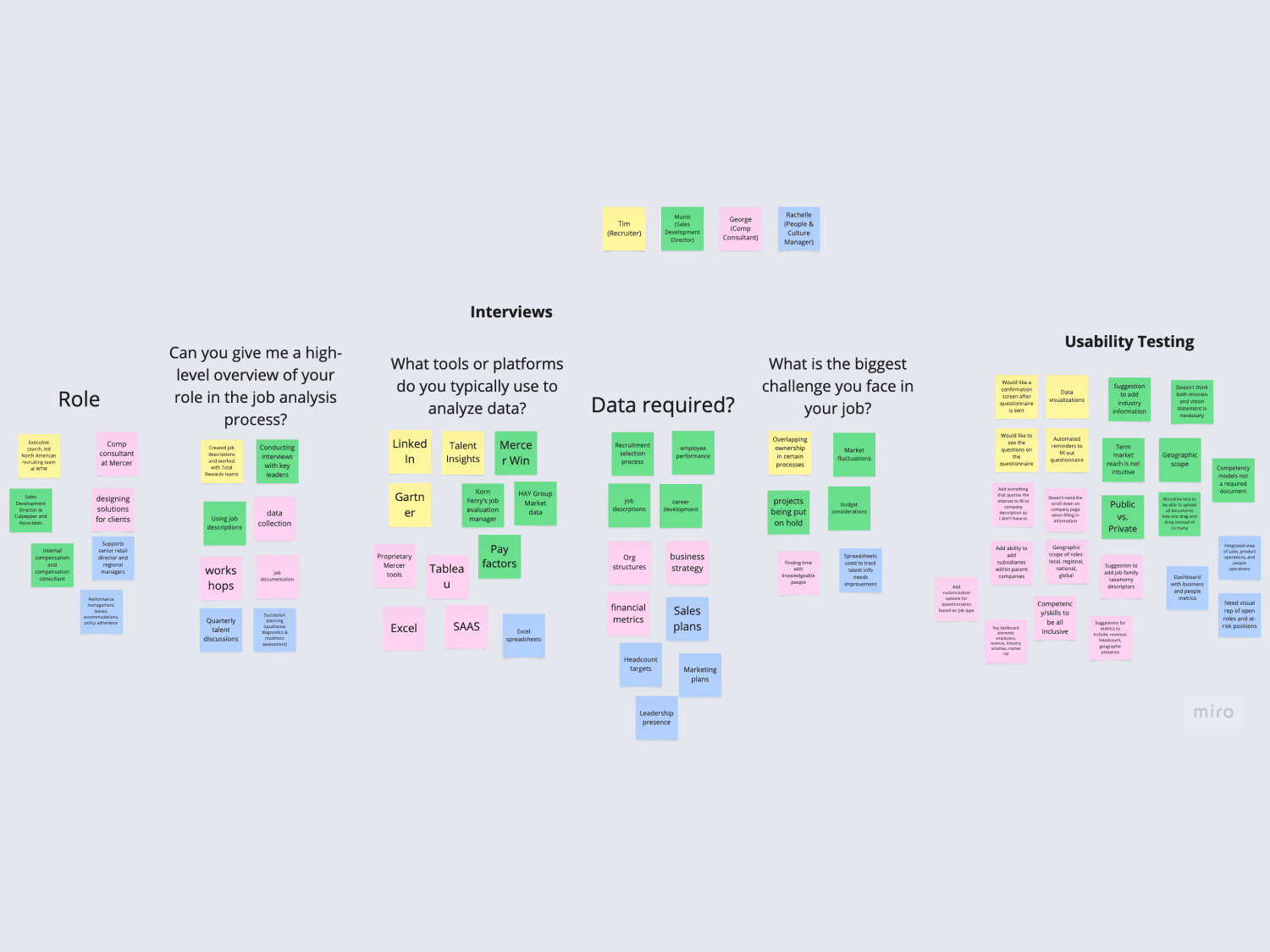
User Feedback Analysis in Miro
Conclusion
The Eryn job analysis platform redesign significantly enhanced the user experience for compensation consultants, addressing usability issues and improving overall efficiency. The improved UX/UI led to higher user satisfaction and enhanced task completion efficiency, offering a streamlined, more effective approach to job analysis.
A key takeaway from this project was the importance of early user feedback. Due to resource and time constraints, user interviews were skipped at the start of the project, which led to missed insights and challenges later on. Engaging users from the beginning would help avoid these issues in future projects.
The Eryn job analysis platform redesign significantly enhanced the user experience for compensation consultants, addressing usability issues and improving overall efficiency. The improved UX/UI led to higher user satisfaction and enhanced task completion efficiency, offering a streamlined, more effective approach to job analysis.
A key takeaway from this project was the importance of early user feedback. Due to resource and time constraints, user interviews were skipped at the start of the project, which led to missed insights and challenges later on. Engaging users from the beginning would help avoid these issues in future projects.
The Eryn job analysis platform redesign significantly enhanced the user experience for compensation consultants, addressing usability issues and improving overall efficiency. The improved UX/UI led to higher user satisfaction and enhanced task completion efficiency, offering a streamlined, more effective approach to job analysis.
A key takeaway from this project was the importance of early user feedback. Due to resource and time constraints, user interviews were skipped at the start of the project, which led to missed insights and challenges later on. Engaging users from the beginning would help avoid these issues in future projects.
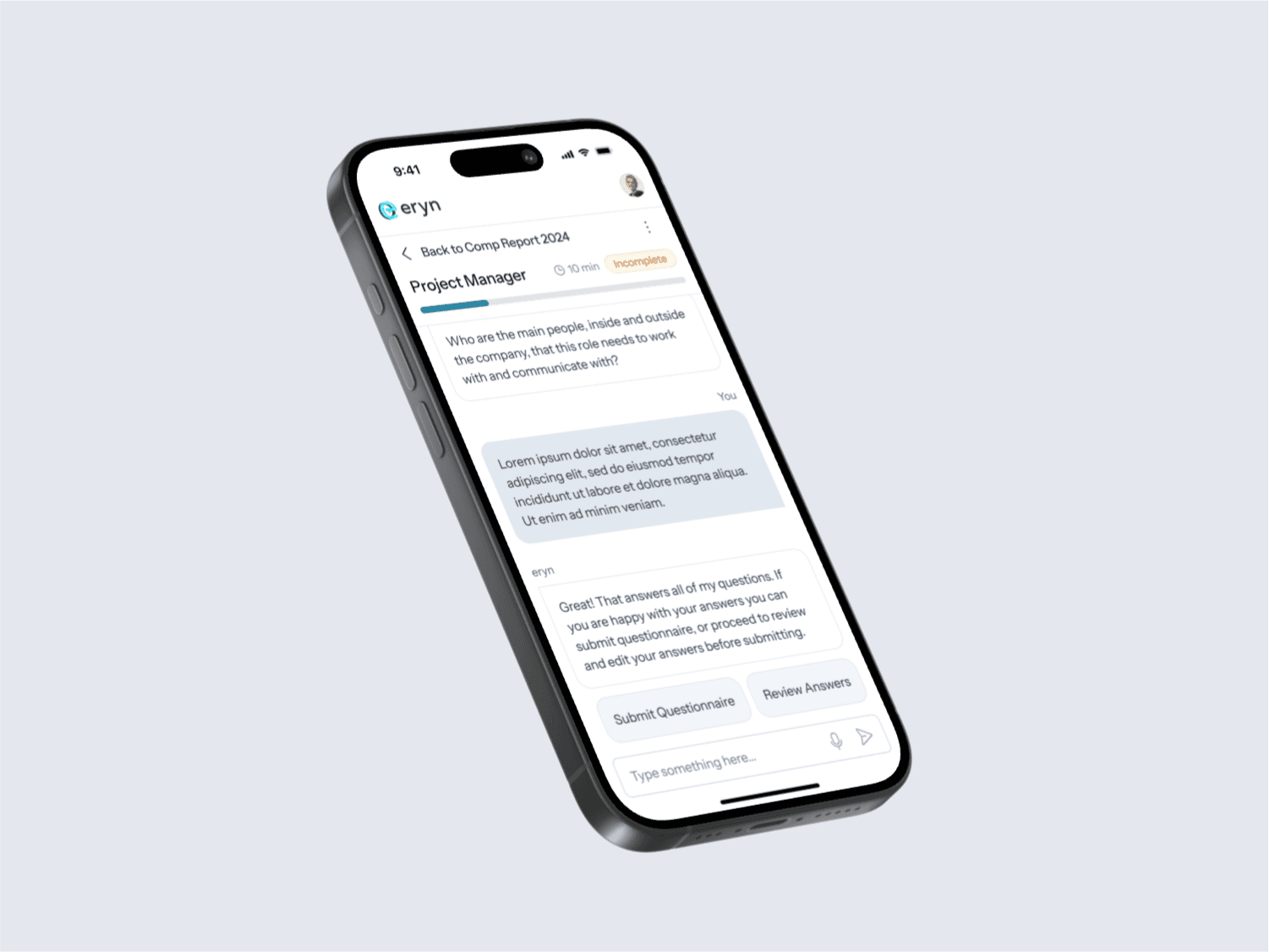
Mobile Screen
Mobile Prototype Demo